Personal Accounting, 21st Century Style!

8 Nov

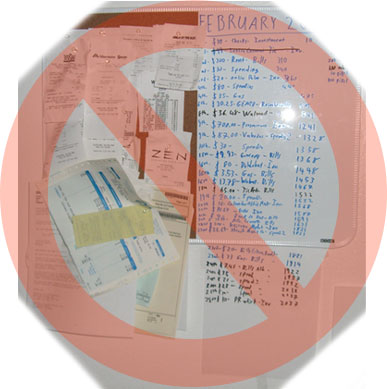
It’s nice to know how much you’ve spent each month in real time. This helps keep your spending in check and is just a good way to keep track of finances. For the longest time I’ve been posting receipts and writing amounts on this dry erase / cork board. No more.

It frequently gets cluttered, is a hassle to tabulate at the end of the month and doesn’t go into much detail about expenses.
For about $200 bucks I bought this thing called Neat Receipts. This system is supposed to digitally organize all your receipts….I originally saw it while browsing Sky Mall in a plane.

I’vebeen using it for a few weeks now, and it’s amazing! The whole system consists of a piece of software and this small scanner which fits neatly on my desk….it’s about the size of a TV remote control:
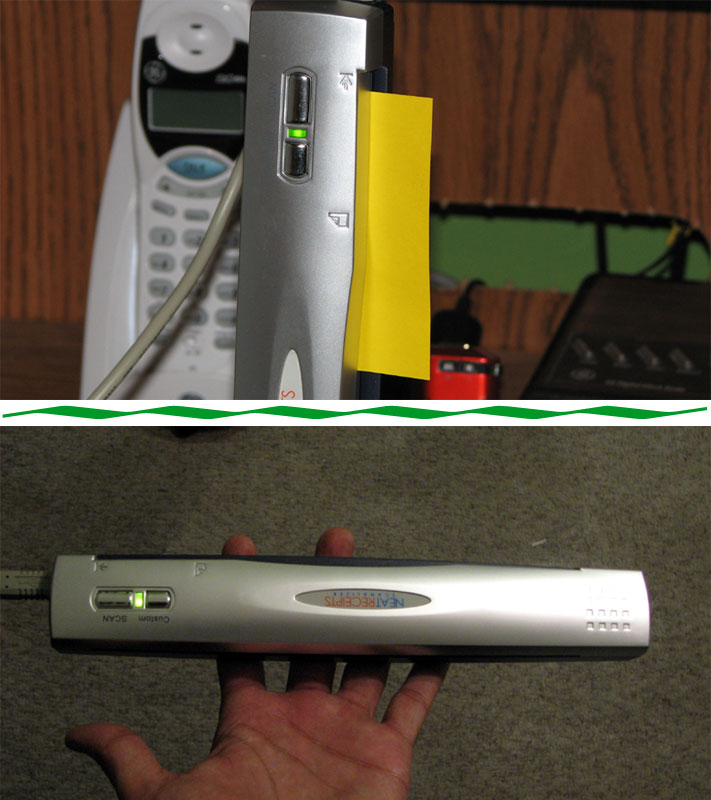
I was originally going to buy it, try it, and return it…but I’m actually very impressed. Just insert a receipt and the software AUTOMATICALLY reads it, tabulates tax, total price, tells what store the purchase is from, keeps a scanned copy, shows date of purchase and categorizes it!! Online receipts are also very easy to enter in. I was very impressed at how much information the program accurately picks up from each receipt.

You can I can see in real time how much I’ve spent for bills, investments, fun etc. in real time without having to input each purchase in an Excel sheet.

During tax time this thing will be extremely helpful because it basically tells you how much was spent for groceries, investments, transportation etc, and you can easily search for receipts digitally which beats rummaging through a large accordion folder full of them.

I’m sure for most people an Excel chart would be fine, but anyone with a considerable amount of purchases per month would benefit from this little system. This is personal finance for the 21st century!

Be Sociable, Share!

    25 Responses to “Personal Accounting, 21st Century Style!”

    1. Will November 8, 2006 at 4:52 am #

      My friends dad uses that for his business and loves it.

    2. Anonymous November 8, 2006 at 6:46 am #

      Didn’t you learn that buying ‘money saving’ gadgets is often counter productive from your phone fiasco?

      I’m guessing this thing cost a pretty-penny.

      LOOPY
      http://www.betathetapi.net

    3. G November 8, 2006 at 7:09 am #

      Hey Loopy, looks like you didn’t read the post. It says it was $200.

      How is this like a phone?

    4. Dennis November 8, 2006 at 8:57 am #

      hmm…

      I use my Credit Card for most purchases and then I download a MS Money File from my CC website… I use MS Money to organize my personal finances.

    5. Arthur Chaparyan November 8, 2006 at 8:59 am #

      Another alternative is to buy everything on a credit card (that you pay off at the end of the month) and download the statement each month right into Quicken, where you have excellent reporting tools for expense categorization and tax deductions.

    6. Eric November 8, 2006 at 3:44 pm #

      Neville, this is banking for the 21st century?! Dude, just install Quicken already… you gotta be kidding me. Accordion files of receipts? That’s the way to do your taxes circa 1995… :-) Seriously. Don’t spend $200 on this, spend $79 on Quicken and it’ll change your life. E

    7. Brian November 8, 2006 at 3:53 pm #

      Can it read receipts in foreign languages like Spanish?

    8. Alex November 8, 2006 at 5:04 pm #

      I saw this in the airport a while back and thought it was a great idea but I won’t be using it as it is not Mac-compatible. :)

    9. jim November 8, 2006 at 5:22 pm #

      maybe you’re spending too much too often if you need a $200 gizmo to keep track of your spending. this problem is solved with an excel spreadsheet that costs you likely nothing.

    10. The Empress November 8, 2006 at 5:46 pm #

      That looks pretty cool – and if it’s something that would save you time, then I think in the long run it’s well worth the investment.

      I might just have to swing by the site and check it out :) Thanks!

    11. Anonymous November 8, 2006 at 8:38 pm #

      This post seems like they paid him to say good things about it. Why would anyone keep receipts like that? MS Money or Quicken would be a much better alternative.

    12. me2press November 9, 2006 at 3:42 am #

      Seems like a good way to store information. I wonder if there is software that can do the same thing with a scanner. I also use a mac so this would not work for me, but it is a good idea. I tried to scan all sorts of documents a long time ago and it seemed more trouble then it was worth so I am not sure the long term usefull ness of this gadget. Let us know in a few months how it is doing.

      http://www.me2press.com/free

    13. Anonymous November 9, 2006 at 7:00 pm #

      i saw this in this months Lucky Magazine (that i read at the bookstore!)…they have a $20 discount promo code in the back.

    14. Gymnast2006 November 9, 2006 at 11:22 pm #

      I’m big on keeping receipts (both for tax purposes and in case the merchant overcharges you–which seems to happen more than i care for). At first i thought this was a spectacular idea, however this thing is about 12-16 months from being Mac-friendly. I dropped PCs as if they were cigarettes and have no intention of going back any time soon.

      So i’ll sit back and wait for the mac version. I hate keeping hard-copies of receipts. i hate snail mail in general too. if you can’t email or text it to me i don’t want it. clutter clutter clutter. yuck.

    15. Anonymous November 10, 2006 at 12:37 am #

      I agree with a lot of other people… go with MS Money 2006. I’ve just started to use it. Amazing Product!

    16. Anonymous November 10, 2006 at 12:43 am #

      Nev, you just love expensive gizmos of limitedd utility, don’t you? While I know many small business owners who throw their receipts into a shoe box which they then take to their accountant and could use this gizmo, I do not see how this gizmo justifies the cost vs benefit in your case. After all you claim to have so few expenses.
      You can pay your bills via credit card, collect miles or something and then get an itemized statement of expenses at the end of the year. Or as has been suggested here use Quicken or similar software and download your bank and cr statements, broker records etc. Such software has an added benefit, it would teach you about accounting (something you need) and filling tax returns.
      While almost anything is better than tracking expenses by scribling on a wall, you have a history of impulsive, expensive “gizmo” purchases. Seems to me you are not spending any time defining your needs and researching for a product that would meet your needs at a reasonable cost.
      Penny wise and pound foolish once again.

    17. MoneySaver November 10, 2006 at 9:39 am #

      Interesting concept, never heard before of such scanner.

    18. ~rick November 11, 2006 at 10:00 pm #

      I saw this as well…was wondering if it really worked. Looks like something worthwhile afterall..thanks for the test drive..~rick

    19. Billy Zelsnack November 12, 2006 at 8:03 am #

      At least have an affiliate link so your post will pay for it!

    20. Anonymous November 13, 2006 at 2:19 am #

      i use a pen and paper, the traditional way!!!

    21. Anonymous November 15, 2006 at 2:47 am #

      Nev – What about as a means to store all of your pf documents in electronic format? Such as paystubs, or banking stmnts? Most old documents?

    22. Steven James November 27, 2006 at 10:20 am #

      Hey, even i use that device and find it very useful. Good to know that someone else is also using it and spreading the word.

      Cheers,

      Steven

    23. Bernard January 19, 2007 at 6:18 am #

      $200! Gee, I am back to the manual data entry at the end of the month into my Excel spreadsheet.
      I tried to charge as much as my expenses into a credit card as possible, not because I needed one. Simply because I will get a statement of how much I spend per month from my credit card company. Anything else paying by cash, back to the manual data entry.

    24. Andrew February 2, 2007 at 9:01 pm #

      Sky Mall to the rescue. That thing is usually chalk full of useless knick knacks and whatnots but it seems you’ve hit upon something. I can’t see spending $200 at this point being worth it but it definitely could come in handy in the future. My guess is in the future you would want an actual person to deal with all of your spending.

    25. Michael October 10, 2008 at 5:27 pm #

      Anyone looked at Shoeboxed.com? Same end result — but cheaper monthly rate and they do the scanning and ocr for you. They have free trials for both individuals and businesses.

    Leave a Reply