When I get an order for HouseOfRave there are two numbers I plugin to get my profit count for the day: the amount of money brought in by the order and the cost I pay the supplier to send it.
It’s a very rudimentary calculation of Income – Cost. With this system some orders would have a high profit, some would be low. Sometimes an order would make me $25 another order of similar value would make me $5. This shouldn’t be the case.
When an order goes way below my margin rate, that means something is funky on my end. So to more obviously identify what is going on, I added a simple income/profit percentage rate calculation. Now with this simple percentage I can more easily pinpoint problematic orders and fix them immediately.
Check it out:
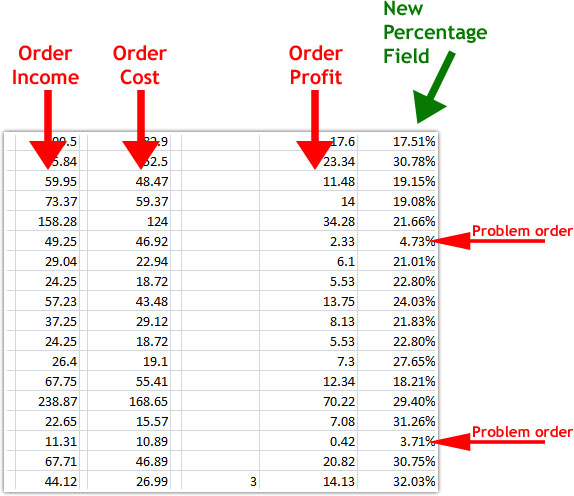
That first problem order was for $49.25, yet I only made $2.33 in profit….less than a 5% margin, yikes! However, orders of roughly similar value bring in at least $12 or more.
So now I can see something is wrong and fix it. With that particular order, the person ordered with 3-day shipping, and my formula for 3-day shipping on the products they ordered was wrong. Easily fixable.
That order isn’t the only problem, in fact almost every order has some small issue. Every order should have a margin percentage rate at or above roughly 30%.
So this set of shown orders brought in $1,168.02 and profited $274.38 for a profit margin rate of roughly 23%. If there were no problems with my shipping table and all prices matched the supplier, then this set of orders would have brought in about $350 instead.
One of the real culprits here is the shipping prices. My software can’t do the same type of calculations as my supplier, so they are always a little off. Hopefully the upgrade can help solve this issue soon.
One of Bob’s Rules really is true:
Anything that is measured and watched, improves.