To-Do List How To

7 Oct

I’ve always been obsessive about the way I keep simple to-do lists for the day…..and my to-do lists have morphed many times through experimentation.

But for about 4 years now I’ve used the same method which seems to work really well for me.

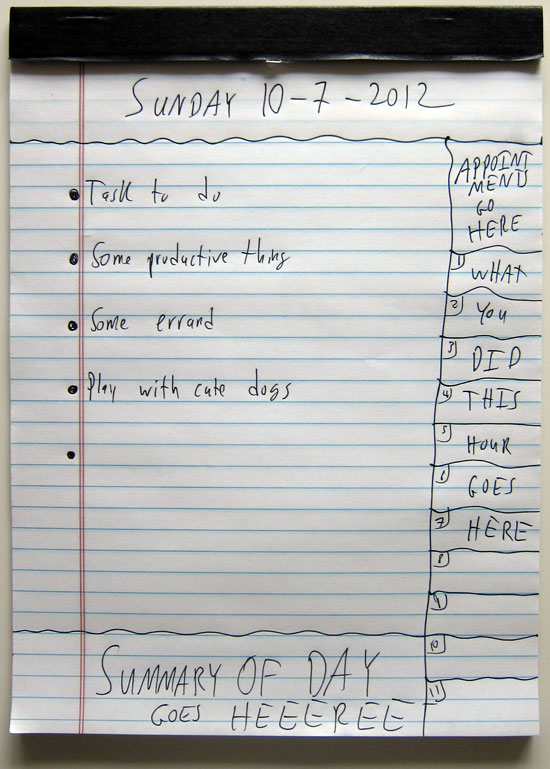
It’s simply a pen and paper……and I’ll shuttup now and you can see it live:


BY THE WAY: I only plan my tasks THE DAY BEFORE.  I rarely ever add on work for the same day (it’s how I stay sane).

It’s Sunday now…….and maybe if you’re dreading Monday a bit, you can plan out your day the same way I do.  It might work for you, it might not.  Give it a try and see if it boosts your productivity :-)
Be Sociable, Share!

    76 Responses to “To-Do List How To”

    1. Paul F October 7, 2012 at 4:40 pm #

      Nev nails it with this “hack”. Many times the simplest is also the most effective / repeatable: certainly true in this case. Thanks for the reminder.

      • Neville October 7, 2012 at 7:24 pm #

        I’ve tried A LLOOOTTT of different to-list things….and for whatever reason, my personal preference has always been this.

    2. Paul October 7, 2012 at 5:01 pm #

      So basic it has to be good. I have reminders and daily planners in about 5 different places. They have all become just like the 3+ in boxes in a office. You know the ones. The one that was important 3 months ago. Then the one from last one and then the new “absolutely have to do box. Plus, having to cary around a physical planner that u can not ignore just because it is merely an ap in a device, may just do the trivk. I’m on it!

      • Neville October 7, 2012 at 7:25 pm #

        Yea…..I LOVE the legal pad. I carry it with my computer at all times!

    3. Helen October 7, 2012 at 5:18 pm #

      Thx Nev for the simplicity of your system and reminder that it’s as important to play (with cute dogs.. Love it). Often so caught up with ‘achieving’ stuff, I forget to give myself some love. Peace mate.

      • Neville October 7, 2012 at 7:25 pm #

        Glad you liked Helen :-)

    4. Linda October 7, 2012 at 5:57 pm #

      Have you read “Getting Things Done” by David Allen? HE’S AGAINST THE DAILY TO DO LIST. And then introduced a pretty detailed “to do” list system.

      • Neville October 7, 2012 at 7:26 pm #

        Weird.
        I personally need a daily to-do done the night before.

        If I DON’T make it the night before, I just jot down a bunch of stuff that may or may not get done.

    5. Linda October 7, 2012 at 5:58 pm #

      P.S. I keep all my to do lists too. I do it in a journal though.

      • Neville October 7, 2012 at 7:26 pm #

        Smart :-)

        You and your journals!

    6. Justin Smith October 7, 2012 at 6:06 pm #

      Like it I will try it out. Thanks for sharing.

      • Neville October 7, 2012 at 7:27 pm #

        Give it a whirl. You might find it doesn’t work as well for you….since everyone has their own quirky way of keeping to-do lists

    7. Ryan Hills October 7, 2012 at 6:50 pm #

      Well, my special To-Do-List pad from Kikki K just became totally redundant! ;)

      Thanks for the tip Nev, I’ve found every couple of weeks I’ll get overwhelmed trying deal with this exact thing, I’m gonna start trying it your way RIGHT NOW!!.

      Cheers

      • Neville October 7, 2012 at 7:31 pm #

        Give it a whirl…..and modify as needed. Hopefully you start keeping on track much better because of it :-)

    8. Gregg October 7, 2012 at 7:01 pm #

      My problem is that as a lowly programmer for a quasi-state agency (for NOW..), I don’t have as much control over my time. So there is an issue with “do X until it’s done” because fuck! It’s time to go home and they lock us out.

      So I have to abandon the goal of completing task #1 (finish bug 2000034) and then switch to a “personal” or “not-at-work” list.

      I’ve been trying to figure this one out for years. Tried everything… Now I just wake up and wonder where I am and why I exist.

      • Neville October 7, 2012 at 7:30 pm #

        Sounds like you have an interesting situation with odd time constraints.

        Although the plus side is you LITERALLY cannot take work home with you :-)

    9. Calvin October 7, 2012 at 7:09 pm #

      Definitely going to try the hourly hack on the side of the page.

      Thanks for the email!

      • Neville October 7, 2012 at 7:29 pm #

        No prob, glad you liked Calvin! The hourly thing definitely is a good way to look back on the day and say, “WOW I’ve been a lazy bastard” if you’re not pumping out work.

    10. Brent Giesler October 7, 2012 at 7:20 pm #

      Good stuff Nev. How do you keep track of something you’d like to do, say 3 weeks from tomorrow?

      Thanks. I’ll hang up and listen….

      • Neville October 7, 2012 at 7:28 pm #

        Good question.

        I have a Google Calendar I use more and more (with smart phones it’s pretty easy)…..but the primary method is a physical calendar I use as a mouse pad.

        Upcoming events go on that. Low-tech, but works!

    11. Alexandre October 7, 2012 at 7:35 pm #

      Nev,

      Most of the times I refuse to use pen and paper just because I want something searchable… or that I can easy “edit” (erase and write other thing), buuuuut…

      …Because of that I ALWAYS procrastinate or don’t use it very often. And…

      …I HAVE THE SAME FELLING WHEN TIC-TIC-TIC-TIC-TICKING THE GOAL! Lol

      I’ll test your way, looks like good, but I think that
      - a smal notepad will suit better for me;
      - and *very important*: you forget to say to begin with the HARDEST task.

      Beggining with the hardest motivates you after you do each because the next one IS ALWAYS EASIER! This works like a charm to me!

      Thanks NEV, keep posting!

      • Neville October 7, 2012 at 8:03 pm #

        There’s something very satisfying about seeing this piece of paper with tasks on it get scratched on as the day goes by.

        When I’m done, it’s always neet to see every single item scratched out.

        The computer doesn’t have the same impact.

        I too like electronic solutions….but NOTHING has kept me as accountable as this so far.

        Glad you learned something :-)

        • Alexandre October 8, 2012 at 11:36 am #

          Aaaannd Im learning kopywrite with your courses! Did a good job? lol!

          And you videos are fantastic: is your “kopystyle” in 3D AND moving!!!

          • Neville October 8, 2012 at 2:20 pm #

            Glad you like them! I try to make them fun for ME to make, as well as the people watching them.

            Stuff is easier to learn when presented in a fun way :-)

    12. Chris October 7, 2012 at 8:13 pm #

      Nev,

      Is it alright if I steal your template and put it onto my goal setting site as a printable PDF.

      I’ll put a link back to your site

      Regards Chris

      • Neville October 7, 2012 at 8:28 pm #

        Go for it :-)

        • Chris October 7, 2012 at 8:35 pm #

          Thanks champion

        • Chris October 8, 2012 at 3:37 am #

          Nev,

          I have made the template it is on this page gave you and app sumo some mad praise in the post.

          http://www.goalsthatevolve.com/free-to-do-list/

          Regards Chris

          • Neville October 8, 2012 at 2:31 pm #

            Oh cool…..hope people use it!

            I actually used to print them out…..but preferred DRAWING them since it was more fun :-)

    13. julien October 7, 2012 at 8:30 pm #

      Hi nev,
      Finding it really cool your tips sharing !
      I’m project manager in France, and I have to use a weekly plan ! On every day i have to justify every fifteen minutes
      spend on each task !
      It’s very difficult exercice indeed but it really helped me organize myself ,
      Here is a snapshot !
      http://i49.tinypic.com/fjfehc.png

      • Neville October 8, 2012 at 2:32 pm #

        YIKES! That sounds intense.
        I’m not sure I could handle looking at that every 15 minutes!

    14. Josh Tanaka October 7, 2012 at 9:05 pm #

      There are two things I want to accomplish with my to-do lists.

      1) Geting my lazy ass to actually start doing something, and
      2) Keeping track of what I’ve done in the past so that I can track back and find where I made the mistake, if I need to.

      So far I’ve tried the following methods for my to-do-list.

      1) Orchestra (mobile+web app)
      2) Any To.Do (moble+web app)
      3) Wunderlist (mobile+web app)
      4) Google Docs
      5) Google Calendar
      6) A notepad

      Winner: The notepad. I looked at it far more often than the rest. I am more likley to write in, flip pages, and carry a notepad than to hit a couple of buttons on my iPhone (although mobile apps seemed more convenient at first). Does anybody have a good scientific explanation for this?

      • Neville October 8, 2012 at 2:39 pm #

        It’s just THERE.
        It’s always ON.
        It never BREAKS.
        You don’t need to power up or down. Just easier right now.

        At some point digital stuff will be easier….but so far a plain old notepad is good!

    15. Greg Hickman October 7, 2012 at 9:35 pm #

      Hey Nev,

      Love this! Question. The section on the right side…Is each block an hour in the day or related to a task that was supposed to be done?

      Just curious as I liked your methods just wanted to clarify the proper use of that right column.

      Thanks!

      • Neville October 8, 2012 at 2:40 pm #

        I personally use each as an hour block. So if I did several things….I mark it. BUUUTTT I don’t obsess over this part. I just scribble a word or two about what the task was. No need to write a freakin journal entry just to track that hour :-)

    16. Beth October 7, 2012 at 10:52 pm #

      I like the idea of making the list for “tomorrow”. Kind of a productive way to procrastinate. And smart so you can stay on track for today’s tasks.

      These days I am battling 3 yr olds that tend to jump in line… so we’ll see how far I get past, “wipe peanut butter off clothes before going out the door”. But for sure I’ll feel more productive if I can cross it off a list!

      Also, this TED talk by Jane McGonigal about productivity http://vimeo.com/16227360 was very refreshing. She encourages people to play at least an hour a day of games.

      • Neville October 8, 2012 at 2:51 pm #

        Yes I’m sure that puts a kink in the day putting out all those little fires. You should make your to-do lists manageable.

        I know roughly how much work I can do, and for average days I try not to over-estimate my capabilities….because then I just don’t finish things, and it carries over to the next day….and the next day….etc

        • Beth October 8, 2012 at 10:39 pm #

          Ah ha. That’s the key isn’t it. I think I tend to OVER estimate what I can get done in a day, hour, minute lately so many things are off-list and take longer than I think. Daily triage. I think for me it becomes a quesiton of when I do get an hour free, what would I rather do? Absolutely nothing, or anything on my list! I usually start with nothing, then guilt wins me over and I start something, late, on my list and it gets interrupted. So I think I will include NOTHING as an item on my list so I can finish one item on my to do list every day. Despite the daily obstacles, I am making progress towards my big goals. Thanks in part to Nev & Appsumo. Comic relief and knowing I’m not the only one who struggles with this stuff! …Oh man, kids crying. Day is not done!

    17. Indika October 8, 2012 at 2:54 am #

      Great video Nev! For years and years, I resisted making lists and diarising stuff – because I was a stubborn rebel. I wised up about a month ago and having lists have meant that I get so much more done and feel happier for it. I tried the a few different things too and have now settled to using a point form list on google docs which I print out and update from time to time. AND, I found it helps to separate Goals from Tasks (as I kept getting to two mixed up). I know I can work even smarter, so will keep experimenting. I like the fact that you a) track what you have done on an hourly basis and b) retained records going back weeks and months and will try that out too!
      Great job and keep hustlin : )
      Indika

      • Neville October 9, 2012 at 7:54 am #

        Yes, the lists make your day MUCH more structured, and you complete the tasks you NEED to do.

        If I didn’t lists I’d simply forget everything I’d need to do :-)

    18. Ben Altieri October 8, 2012 at 5:26 am #

      Thanks Neville for reminding us about simple to do lists. I used to do them years ago but I stopped after a few years. The problem I have with pen and paper is not being able to find the pen and paper after one day.

      • Neville October 9, 2012 at 7:55 am #

        You’re welcome Ben!

        You might consider taping the pen and paper to your shirt like they did when they sent a note to your parents in Kindergarten :-P

    19. David October 8, 2012 at 7:38 am #

      I’ve always found it easier to write things down on a legal pad, note card, or something similar and carry it around and cross it off as I accomplish the tasks. Simple is best

      • Neville October 9, 2012 at 7:55 am #

        Yes….it works very well, and never runs out of battery :-)

    20. Bruno Yudi October 8, 2012 at 8:32 am #

      I certainly will test this method! I think that will be the #8540 attempt to organize my ToDo list! Thank you for the tip, if works I´ll pay you a beer when you come to São Paulo…

      • Neville October 9, 2012 at 7:56 am #

        I think you might like some VARIATION of this at the least. Definitely try covering up your to-do-list with paper and move one down at a time. That helps A LOT.

    21. Ray Lee October 8, 2012 at 8:48 am #

      I like to order my to do list in order of importance. That way, I know I’m getting the most important things out of the way in case I run out of steam later in the day! Also (and this is a bit geeky), I put each task as an appointment in my daily calendar so I know what I’m supposed to be doing at any one time. This helps me prevent procrastination and distraction.

      Thanks for the post Nev!

      • Neville October 9, 2012 at 7:58 am #

        I used to do that…..but then I’d know in the back of my mind that only hard stuff was in the beginning……so now I don’t make a very strong effort to order them by importance.

        So long as a scootch the paper down and get the next thing done, and I do that till I’m DONE…..everything will get done anyways

    22. Chris October 8, 2012 at 9:37 am #

      Back when I was a broke-ass college student I always carried around a pen & a little handmade booklet, folded from a single sheet of paper. Whenever an assignment was announced or something popped in my head, I’d jot it down, with a deadline on the far right, if applicable.

      I just rediscovered the tool I used to make my little pocket booklets, and can’t believe I forgot about it: http://www.pocketmod.com/

      I should start doing this again, in conjunction with Neville’s Time Log & Big Pad of Priorities.

      PocketMod to collect, NTLBPP to complete.

      • Neville October 9, 2012 at 7:59 am #

        Nice……I used to PRINT this form out….but it always felt like a chore, and I needed to have a printer around. I just starting taking 3 seconds and drawing lines on the page instead and have been doing that ever since.

    23. Jon Michael October 8, 2012 at 9:52 am #

      NEV-QUESTION… How do you abstain from adding TOO much on your TO-DO List? How do you find that SWEET SPOT? I find my appetite is ALWAYS bigger than my stomach (for productivity) and get frustrated when I don’t complete everything. HELP.

      TIP – Pre-plan a brain drain TO-DO! You can become brain DRAINED and require a break after several hours (or minutes HAHA) of intense focus and problem solving… Soooooo I like to pre-plan a TO-DO that takes little brain power i.e. cleaning the house or going for a run. If that brain-dead activity is planned, I’ll recognize my mental fatigue and hit that TO-DO. I get more done and give the olde brain-skee time to recover and get back into the “hard” stuff after my productive “break”.

      Thanks for sharing this sweet action you sexy bitch you.

      • Alexandre October 8, 2012 at 11:33 am #

        Jon!

        Well, for me it’s not too easy to do it, but I learned A LOT about simplifying my tasks with Leo Babauta.

        Check his blog, you prabably already know, zenhabits.net.

        And his book, Zen To Done is AWESOME: http://graduandoninja.com/zen-to-done

        His ideas about the weekly goals, big rocks and MIT’s (Most Important Tasks, for each day) – ok, not exactly his idea, but you get the point! – are fenomenal!

        In his ZTD, he teaches to have just 3 MIT’s daily. And If you do anything else, good, but not necessary…

        Best Regards!

      • Neville October 9, 2012 at 8:01 am #

        So over the course of time I know what I can handle, and what I can’t.

        If I pile on a HUGE amount, the to-do list doesn’t get done.

        However I also know when I’m just being lazy and doing too little.

        I know that things like writing blog posts always take longer than I expect…..so I account for that in my to-do list.

        Experiment with how much you can or cannot get done……it’ll be different from person to person.

        And some days I don’t NEED to do as much stuff. And when I get to the end of the to-do list….I stop working and go play!

    24. Arik Ermshaus October 8, 2012 at 10:01 am #

      I love this method! Use it for a year or so now and it’s mind blowing how much you get done with it and especially this things you should do since a long time.

      …You just write ‘em down and do them the other day! BAM!

      GREAT MAN!

      • Neville October 9, 2012 at 8:02 am #

        Wow….you’re living proof it works!

        Yes, this method is VERY simple and effective. I’ve tried more high-tech and complicated versions in the past….but this is the only thing I’ve stuck with for so long.

    25. Brandon October 8, 2012 at 11:01 am #

      Wanted to know if you did a custom blog through woo or if it’s one of the templates? Looks good as does everything you do.

    26. Lexie October 8, 2012 at 1:36 pm #

      Got to admit, at first i was like “bleh, it’s just a to do list thingy” then I saw the hours section at the side, that’s genius! especially for someone like me. with just a normal list i might get 3 things done in 10 hours because i waste so much time in between, but seeing the hours actually keeps you focused not just on doing the errands, but being efficient with the time too. thx dude

      • Neville October 9, 2012 at 8:04 am #

        I KNOW! The hours make a huge difference. I just like to make sure I fill up the right side for the day to make it feel like I did some work.

        If I only see three hour boxes filled in…..I can tell I had a lot of excess time where I didn’t do anything.

        Give it a try!

    27. Tony Spencer October 9, 2012 at 8:27 am #

      Can you give examples of things in your hourly boxes? How are they different from the items in the to do list?

      I think this could be a game changer for me. I’ve been making to do lists on scratch paper on and off for a few months but was missing two key points:

      Put it in a central notepad and archive it (mine are scattered ad hoc in my office with some items not crossed out)
      Do it at night (or near end of the day)

      Thanks for this!

    28. Nickolay October 9, 2012 at 1:01 pm #

      Hi Nev, on my to do list: new idea validation. Where do you think is the best place to validate a new type of doorbell?

      • Neville October 9, 2012 at 1:08 pm #

        Several ways:
        1.) Some sort of industry event (like a home-builders thing).
        2.) Kickstarter
        3.) Go door to door and try to sell/install it for people.
        4.) Get a provisional patent on it and see if manufacturers are interested.
        5.) Post it in the doorbell section at home depot, and see if people pick it up and try to buy it (This is kinda how Tim Ferriss helped validate his book).

    29. Nickolay October 9, 2012 at 1:25 pm #

      Lol, thanks, the Home Depot idea is great.

    30. Casey October 10, 2012 at 2:05 pm #

      Nev, love this to do list. There are a bunch of really cool things going on here. I love the hourly track of what you have or havn’t done. Just started using this list and it works great. I will check in in a couple weeks. Question, how do you use the summary section?
      A. General review of the day
      B. Why you do will or not so well, ideas to improve.
      C. Other random stuff you did that was not task related and tracked on the hourly tally
      D. Something else…

      Thanks

    31. Paolo October 10, 2012 at 10:52 pm #

      Hey Brown Sumo,

      This ridiculously simple (and sorta ugly) to-do list helped me make more sales.

      I had to make it prettier though…

      So I made a few minor changes and I decided to NOT use it on paper.

      I’ve got a blank template that I just copy and paste onto Evernote each night. And I’ve got it “popped out” on my laptop the WHOLE day.(I use the “strike through” button to cross out tasks.)

      Reviewing it each night helped me boost my productivity each hour – and allows me to put into place some better habits…

      Like reading 1 Halbert letter, 1 winning sales letter, 1 email sales letter, and then writing a better broadcast to my list.

      I don’t know what kind of voo doo magic you put on me, but thank you.

      Love,

      Paolo

      P.S. This to-do list actually makes me happy.

      I just finished “Delivering Happiness” and I think this is the reason…

      This to-do list (especially the hours part) shows you perceived progress and by writing tasks the night before you get perceived control of your day.

      Or maybe I’m just crazy.

    32. Kurt October 11, 2012 at 10:30 am #

      Good idea Nev, I’ve been using paper notepads for to-do lists for awhile now. I use the smaller 5×8 size (Jr. legal size) in a “padfolio” that makes it easy to carry around. I’ve always just used a simple list of things to do with a area at the bottom for a shopping list, I’m going to try your format for a bit to see how it goes.

    33. Biswashree October 12, 2012 at 5:02 am #

      After watching your video, I have been trying to use this TO-do list.And all thanks 2 you, I am more productive than before. More than cutting things off the list, I love filing up those little boxes on the side….Good stuff….Keep ‘em coming :D

    34. Jemma October 12, 2012 at 5:32 pm #

      Hey Neville

      I stumbled on to your blog by accident and wanted to say is this post (and some of the other motivation type posts) are great! I am a psychiatry trainee and between regular day work, on call shifts, exams, research and audits not to mention trying to grasp at some aspect of a social life, I have lots of read books about time management and realising goals, but seeing your to do list (mine was just a regular old list) has completely changed my productivity. I was pretty good before, but with the timings down the side, feel like each box needs to be accounted for has just made me feel more in control and more productive….and I fill one box with for chilling – reading your blog, tea and cake (I am from England and have now legitimately got afternoon tea on my to do list!!).

      Looking forward to more posts like these!! :)

    35. Tiago Vieira October 13, 2012 at 9:05 pm #

      Check this:
      http://papercal.wordpress.com

      it’s my recent project. A new calendar to manage tasks and appointments

    36. Tiago Vieira October 13, 2012 at 9:07 pm #

      Hey i’m working in a recent project:

      http://papercal.wordpress.com

      A new calendar to manage your tasks and appointments, check the website.

    37. Norm October 14, 2012 at 6:13 pm #

      Hey Nev,

      Thanks for the tip. I started using your trick today … hopefully it will not be another to do list that I start and not complete.

      Thanks
      Norm

    38. Sam October 17, 2012 at 5:28 am #

      Hi Nev,

      Great tip, always refreshing to go back to the basics. Now all I need is a pen and paper…

    39. Faisal Farooqui April 10, 2013 at 7:18 pm #

      Great and simple post. It kind of reminded me of another very similar setup by David Seah: http://davidseah.com/pub/downloads/pceo/etp/ETP01-2011-3HUS-BW.pdf

    Trackbacks and Pingbacks

    1. Deconstruct Your To Do List for Greater Productivity - October 25, 2012

      [...] I’ve been teaching people time management practices for a while now. I also teach people about personality type differences. Most traditional time management practices, like Get Things Done, or Time Management from the Inside Out are great systems, but if you are a person who has difficulty with templates, other people’s systems, and if trying to stay organized with binders doesn’t allow you to live in the moment or be creative, I was jazzed to see this awesome video by Neville of nevblog.com. [...]

    Leave a Reply